




Good news for the ArduPilot community: the new 5.2 release of ArduPilot Methodic Configurator, ArduPilot’s official vehicle configuration tool, now comes with a built-in integration of Skybrush Log Analyzer.
From now on, you can send your .bin flight logs to Skybrush Log Analyzer directly from the Parameter Editor of Methodic Configurator, and get automated, deterministic test results without leaving the configuration workflow. This makes it easy to spot problems, such as high vibration levels, before your next flight.
Why does this matter? #
ArduPilot Methodic Configurator guides you through the configuration of your ArduPilot vehicle in a clear, structured and reproducible sequence of steps. A key part of this process is flying test flights and checking the resulting logs before moving on to the next configuration step.
Skybrush Log Analyzer is exactly the tool for this job. It runs a predefined set of deterministic tests on your log file and returns organized, qualitative answers, grouped by severity. With the new integration, the configure – fly – analyze loop becomes much shorter and simpler.
How does it work? #
The workflow is described in detail in the Skybrush Log Analyzer chapter of the Methodic Configurator user manual. In short:
- In the Parameter Editor, click Analyse a .bin log, select Skybrush log analyser and choose a
.binflight log. - The first time, log in with a Skybrush API key. You can generate one in the developer area of your Skybrush account. Methodic Configurator stores the key, so you stay logged in next time.
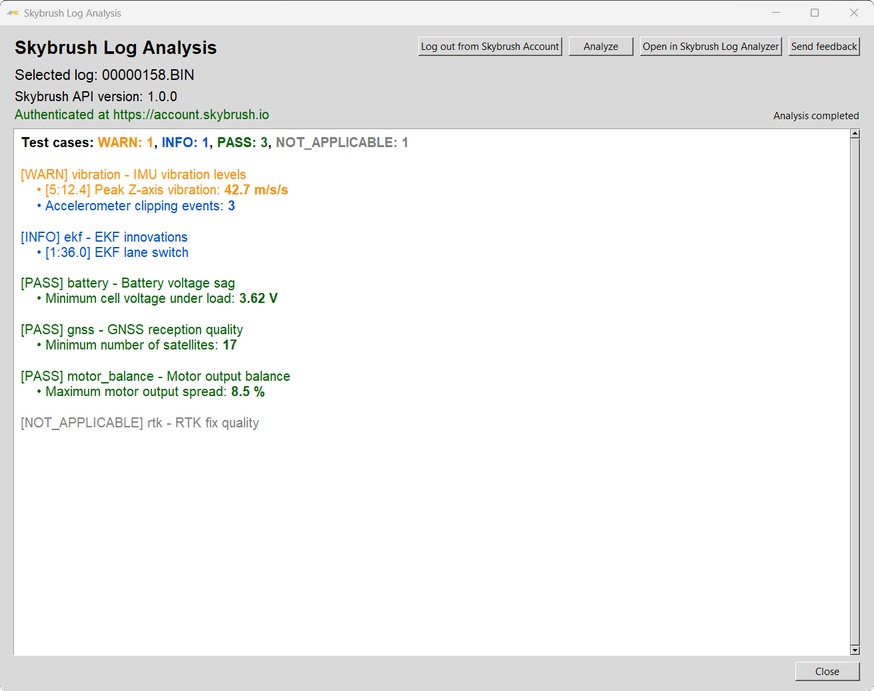
- Click Analyze to upload the log and run the analysis.
- Read the results: a summary of checks per status, followed by one entry per check, most severe first, with measured values and flight times where available. Statuses are color-coded (
FAIL,WARN,INFO,PASS,SKIP,NOT_APPLICABLE), and you can search the results with Ctrl+F.
If you need more, click Open in Skybrush Log Analyzer to open the same analysis in the Skybrush Log Analyzer web application, already logged in, with more detailed views and additional log analysis services such as historical comparison of your logs.
Feedback built in #
Found a suspicious result, or missing a test that would answer your specific question? Click Send feedback in the analysis window to send your report or suggestion directly to the Skybrush team. The log name, its hash and version information are attached automatically, so our engineers can follow up quickly.
Get started #
Update to ArduPilot Methodic Configurator 5.2, create your free Skybrush account if you do not have one yet, and analyze your next test flight log with a single click.
Skybrush Log Analyzer is currently free of charge during its beta phase. If you find it useful and wish to support us, please consider a one-time or recurring donation.
We are grateful to the ArduPilot Methodic Configurator team for the smooth cooperation. As always, we welcome your thoughts on our Discord server.