



Skybrush Live 2.16 is out. This article highlights the main features and improvements of versions 2.15 and 2.16 since version 2.14.
Drone swap dialog #
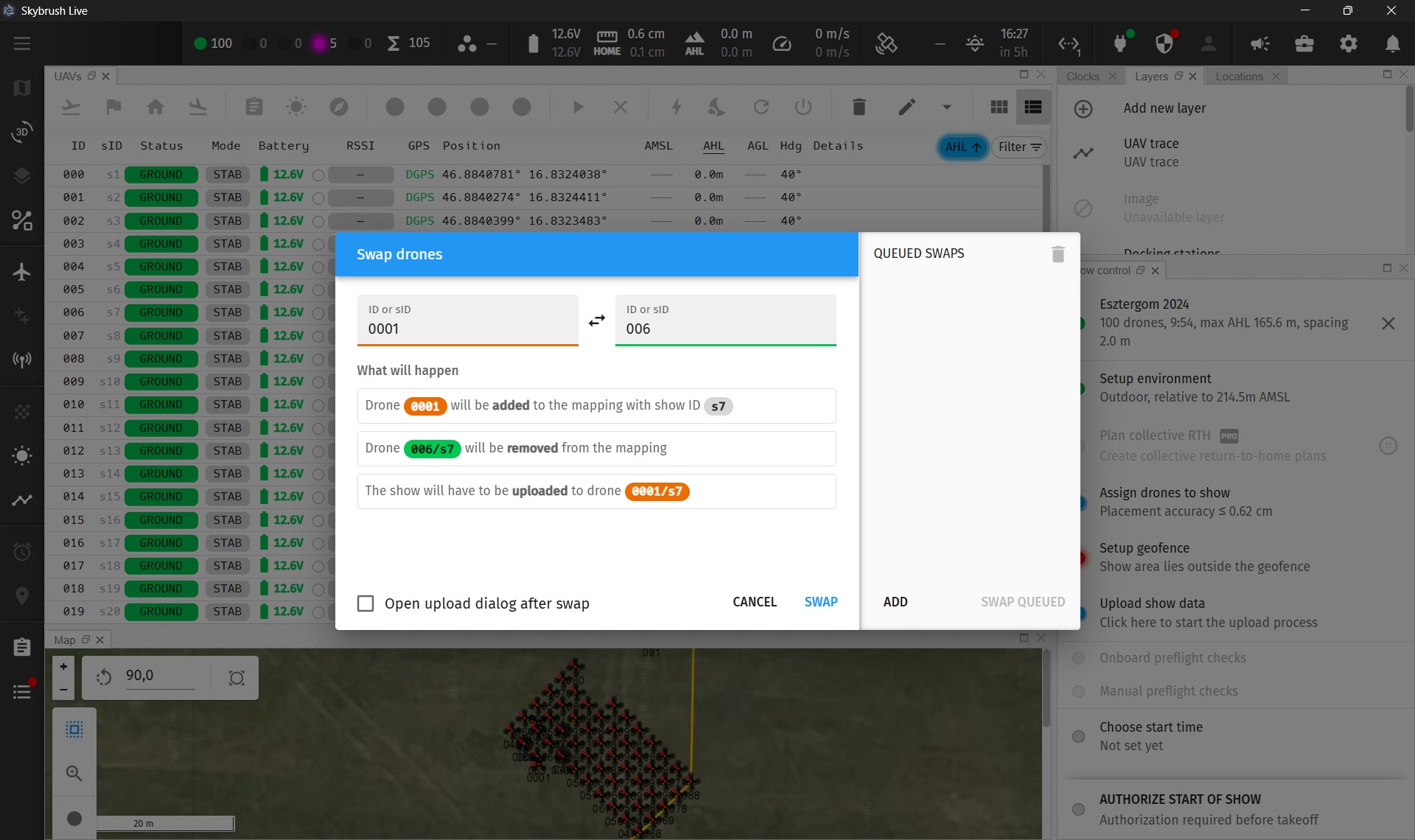
Replacing a faulty drone right before a show is one of the most common tasks during show preparations. Until now, this required editing the mapping manually. Skybrush Live now offers a dedicated dialog for swapping drones, making this procedure quicker and less error-prone, exactly when time is the most precious.
While we were at it, we also made the mapping editor clearer: when the mapping is being edited, a floating orange pill indicates this to the operator, and the dropdown menus on the right side of the UAV panel toolbar are now the same both in and outside of the “Edit mapping” mode.
Synchronization between multiple Live instances #
Larger show teams often use several Skybrush Live instances connected to the same server. Starting with this version, changes to the show settings, the LED light control and the RTK source made in one instance now appear in all other instances automatically, so everyone on the team sees the same state.
⚠️ WARNING: This feature requires Skybrush server 2.61.0 or later.
Fixing inconsistent parameters #
The parameter consistency check introduced in the previous release in the Toolbox widget has become even more useful: its results can now be used to set the deviating parameters of the affected drones to the majority value with a single click. Finding and fixing misconfigured drones has never been easier.
RTK satellite signal strength chart #
The RTK status panel, which appears when the RTK status header widget is pinned to the workbench, now also shows the signal strength chart of the satellites tracked by the RTK base station. This lets you keep an eye on the quality of your RTK corrections continuously during the show.
The RTK status widgets also became more reliable: they no longer show stale satellite counts and signal strengths after the connection to the server is lost, and the RTK status is now queried from the server only once even if multiple widgets need it at the same time.
The RTK source selector has been removed from the “Setup environment” dialog, as RTK sources are typically configured in the RTK status dialog anyway.
Further improvements #
Several smaller additions and usability improvements made it into these releases:
- The manual preflight checklist can now be reset without unloading the show.
- The desktop app now has a UI scale setting in the Settings dialog. Note that we officially support only 100% scale, as we do not have the resources to test the UI at all scales, but the option is there for those who are willing to put up with minor inconveniences.
- Skybrush Live now shows a permanent warning when the server reaches the object limit of its license.
- Shift-clicking a row in the UAV status summary list adds the corresponding UAVs to the current selection, while Cmd-clicking (Ctrl-clicking on Windows and Linux) toggles them.
- Header widgets pinned to the workbench can be brought to the front by clicking on the pin icon again, and header widgets now clip properly when the window is too narrow.
- Upload panels can now conveniently show 5-digit UAV IDs.
- Drones in the RTH state without any other error code are now counted properly in the UAV status summary header widget.
Additional fixes #
Beyond the headline features, we have — as always — worked hard to update dependencies, close open issues, and fix bugs. Most of this work is invisible to users, but the fact that Skybrush Live has remained a stable, modern interface for more than 6 years speaks to the strength of this continuous effort.
For a detailed list of changes, see the official changelog or browse the codebase.
Support open source #
Skybrush Live is open source. We are truly grateful to all our partners who support us by purchasing and using the Professional license package, which unlocks enhanced features and recognizes that open source can only thrive when its core team is supported. Join us on this journey and help Skybrush blossom for years to come.
Provide feedback #
We encourage you to share feedback on our Discord server or directly in the issue tracker of the corresponding repository on GitHub, whether it is about bugs, feature requests, or other ideas.
Community feedback significantly shapes the evolution of Skybrush. Thank you for contributing!