



Skybrush Studio for Blender 5.0 is out. This blog post summarizes new features since version 4.2 released in March.
Supporting Skybrush Studio Cloud #
The new version of Skybrush Studio for Blender is a new major version, because we are proudly releasing Skybrush Studio Cloud and Skybrush Studio X Cloud, our new set of drone show design products relying on our cloud-based server allowing for dynamic seat management. If you purchase these products instead of using Skybrush Studio Server locally, offline, you will be able to change your hardware ID assignment to your license any time within reasonable limits.
The cloud-based product variants also come with a new component, Skybrush Gateway, which provides trusted signing services to be used with our cloud server and also displays progress information about long-lasting Blender tasks during your design workflow.
To read more about Skybrush Studio Cloud, read our related release blog post.
⚠️ WARNING: Users upgrading to this version of Skybrush Studio for Blender should check the redesigned add-on settings and select the appropriate operation mode of the add-on (community server, local server, or Skybrush Studio Cloud). The new default setting is “Community server”, therefore users who use a local Skybrush Studio server instance or a cloud-based server should change it accordingly.
Introduced drone grouping #
Similarly to Skybrush Live, now Skybrush Studio also has a feature to organize drones into groups. This simple and handy feature can be used for many tasks, such as applying light effects or transitions to only a specific group of drones, marking your pyro or laser drones and keeping them separate throughout your design, etc.
Try the grouping functionality with the Drone Groups panel on the Skybrush tab, or edit the Drone Groups collection with pure Blender tools.
Enhanced pyro design #
To support more professional pyro design, we have added yaw and pitch properties for every single pyro trigger event for supporting directional pyro shootings, as used by some of our professional customers, for example by Pyroemotions.
These new parameters are transferred to the Finale 3D (.vviz) exporter for proper visualization. This exporter also got another related new parameter: you can add an arbitrary time offset to your drone show in .vviz to be able to align your show with the time axis of Finale 3D easily.
We have also added a button to the pyro panel to retrieve pyro payload parameters from the currently selected drone and channel, to be able to modify pyro trigger parameters more easily.
Adjustable velocity profile of transitions #
Each automatic transition planned by Skybrush Studio Server now has an adjustable “Velocity profile” parameter, which defines how the drones move over the transitions in time. Besides the previous default smooth (parabolic) velocity profile you can now define completely linear ones, or ones that are linear from one side and smooth from the other side. This allows for more precise timing and minimum distance calculations of takeoff operations and in general adds more flexibility to your design.
Downwash minimization during layered takeoff #
We created a new dedicated decomposition method for takeoff grids to provide takeoff layers in a way that minimize downwash from drones above, which can help avoid initial crashes and other misbehavior in dense takeoff areas.
Users do not have to upgrade anything; the new Skybrush Studio Server backend uses this takeoff layout automatically.
Light effect presets #
Starting from the pull request of @PeiYi, our community member on Discord, we have started to add light effect presets to speed up drone show design with predefined patterns that are generally used to make your shows more colorful.
You can experiment with these presets by choosing the “Light preset” option of the “Output X” dropdown on the Light effect panel in Blender.
⚠️ WARNING: Light effect preset support is experimental yet, and presets are subject to change until the final format of the feature settles.
If you have more ideas for presets, do not hesitate to share them with us for us to include in the official releases in the future!
Audio embedded in .skyc files #
The Skybrush Compiled Format (.skyc) contains a lot more information about drone shows than most external drone show formats. Besides Bézier-interpolated trajectories, compressed color animations, pyro or yaw control data, it can also include all kinds of metadata about the show, such as its title, geodetic origin, or external media.
To exploit the capabilities of the .skyc format more, from now on you can add a single .mp3 music file into the VSE editor of Blender and export it automatically to your .skyc file, to be played alongside your show automatically by Skybrush Viewer or other visualization software.
Note that at the moment only .mp3 files are supported and the first one found in the VSE editor will be used by the .skyc exporter.
Substantial increase of light effect playback and render speed #
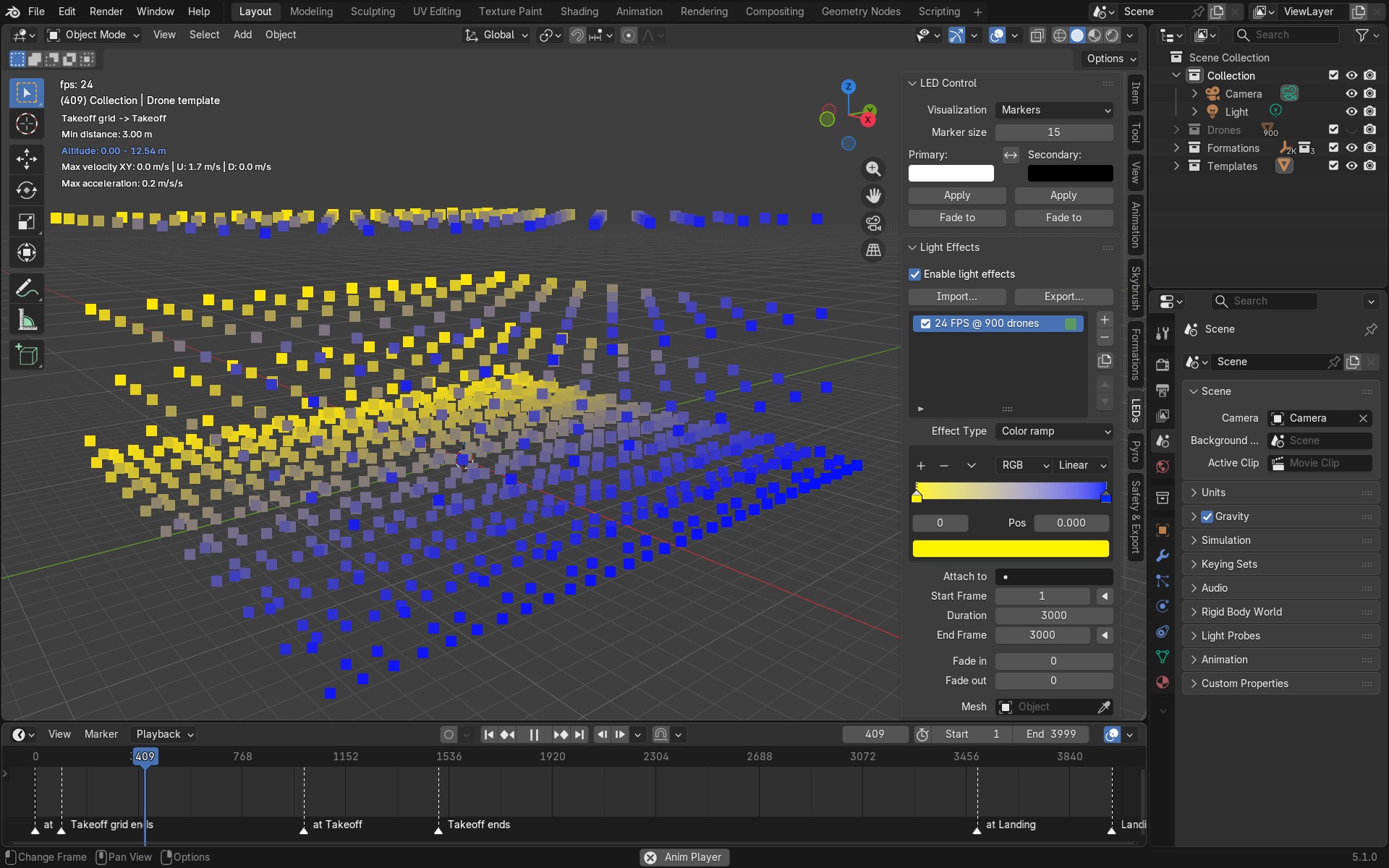
Thanks to community feedback and support by our Discord users @Jefferson Rausseo and @Happyrobot33, we have refactored drone color animation visualization in Blender. You can now choose between detailed or fast rendering options. According to our initial tests, the new overlay marker type visualization method substantially increases playback speed, making it possible to previsualize your shows in real time even with thousands of drones!
As a side effect, the rendering speed of the drone shows is also substantially increased, reducing render times by around a factor of two, depending on the number and type of light effects used.
We are especially grateful for users who take the time and energy to support us with well prepared pull requests. This is the most effective way to shape the evolution of Skybrush Studio for Blender and enhance its set of features for everyone!
Additional fixes #
We could not develop so intensively without our community and the users who take the time to report bugs, anomalies, and feature requests. Thank you for being part of this process.
For a full list of fixes and changes, see the official changelog.
Providing feedback #
Our intent is to keep as much code open source as possible. In return, we ask those who design large commercial shows to purchase a professional license for Skybrush Studio for Blender to support its maintenance and development. We also encourage you to share feedback on our Discord server or directly in the issue tracker of the corresponding repository on GitHub, whether about bugs, feature requests, or other ideas.
To get a snapshot of our open development of Skybrush Studio for Blender, browse the latest pull requests. If you are a developer and you are open to share your own contributions with the community, please issue your own pull requests!
Community feedback significantly shapes the evolution of Skybrush. Thank you for contributing.