



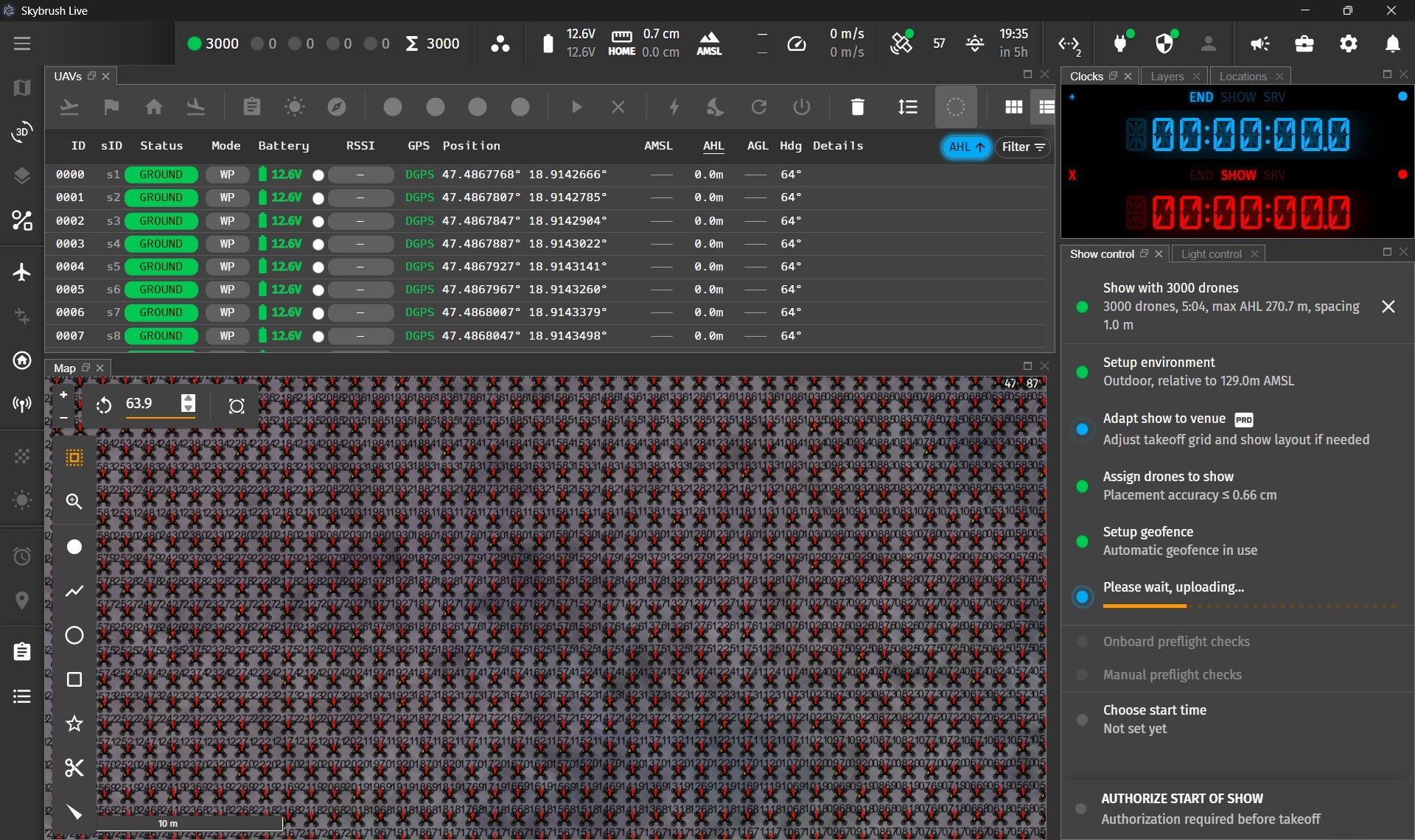

Skybrush Live 2.13 is out. This article highlights the main features and improvements since our last release tested with 5000 drones.
Selection groups #
We are happy to finally introduce the long-awaited selection groups, so you can save and recall custom selections of objects or drones with a smooth, simple workflow.
You might ask what it is good for. Here are a few examples:
- Select drones with a specific problem and store them in a temporary group for later processing.
- Select drones with a specific type of pyro to be able to recall and identify them easily later on.
- Select drones according to hardware types to be able to differentiate between them easily.
- Select drones that have some special role in a show to be able to treat them individually.
- Select drones returning from maintenance to keep an eye on them.
- etc.
Selection groups are available as a new widget in the Skybrush Live header, to the left of the UAV status widget. Hover over it to see the tooltip with all the functionality you need:
- Easy creation of new groups
- Easy recall of existing groups
- Easy removal of existing groups
- Custom naming of groups
- Hotkeys for quick reach
Just like you can select individual drones by typing their ID or sID and pressing Enter, you can now select previously created groups by typing g and the group identifier, for example g1, g2, etc.
Try it and let us know how you like it and what you still need.
Individual coloring of drones #
The UAVs panel now includes four colored buttons (red, green, blue, white) to temporarily color selected drones with predefined basic colors. This makes it easy to highlight drones on the ground or in the air, helping field operators find and identify drones they need to handle, or the drones surrounding a malfunctioning unit when you cannot communicate with it directly.
New parameters for show adapt #
The relatively new show adapt panel gained several parameters that support fully parametric show redefinition and quick on-site adjustments. New parameters include:
- altitude offset to shift net shows vertically
- layered or organic takeoff to add diversity even in the takeoff phase
- new coloring options for the same reason
The show adapt tool is available for PRO license holders only.
Refactoring the show upload status feedback #
We invested significant effort in refactoring the status display for individual and all drones during the show upload process. The new solution keeps a history of recent upload statuses and clears the status on events that should trigger a new upload, making preparation more secure and less stressful with accurate operator feedback.
Recovering RTK antenna position from last surveys #
In previous versions it was sometimes frustrating to detach your RTK base or disconnect from the server and then have to restart the antenna survey. The good news is that this is now in the past: Skybrush Live stores the latest survey history and lets you recover recently surveyed antenna positions for reuse.
Selecting all drones without a hotkey #
A community request was a button for selecting all drones. You can now press the sum icon on the UAV status widget to do this. It is a small change that makes the UX smoother. Try it when you need it!
Parameter upload targeting individual drones #
In the parameter upload tool you can now define parameters that should be uploaded to a single drone using three columns: ID,NAME,VALUE, while NAME,VALUE is still supported for common uploads.
This feature makes it easier to convert drones from other show software running on PX4 instead of ArduPilot, while preserving individual parameters such as motor compass calibration that would otherwise take a long time to recompute across large swarms.
The method works in practice, and we are happy to welcome more customers who see how convenient and stable the open-source Skybrush ecosystem is compared to many closed-source competitors.
Support the open-source #
Skybrush Live is open source. We are truly grateful to all our partners who support us by buying and using the PRO license package, which unlocks enhanced features and recognizes that open source can only thrive when its core team is supported. We encourage you to join this journey and help Skybrush blossom for a long time.
Provide feedback #
We encourage you to share feedback on our Discord server or directly in the issue tracker of the corresponding repository on GitHub, whether it is about bugs, feature requests, or other ideas.
Community feedback significantly shapes the evolution of Skybrush. Thank you for contributing!